
Choose your file
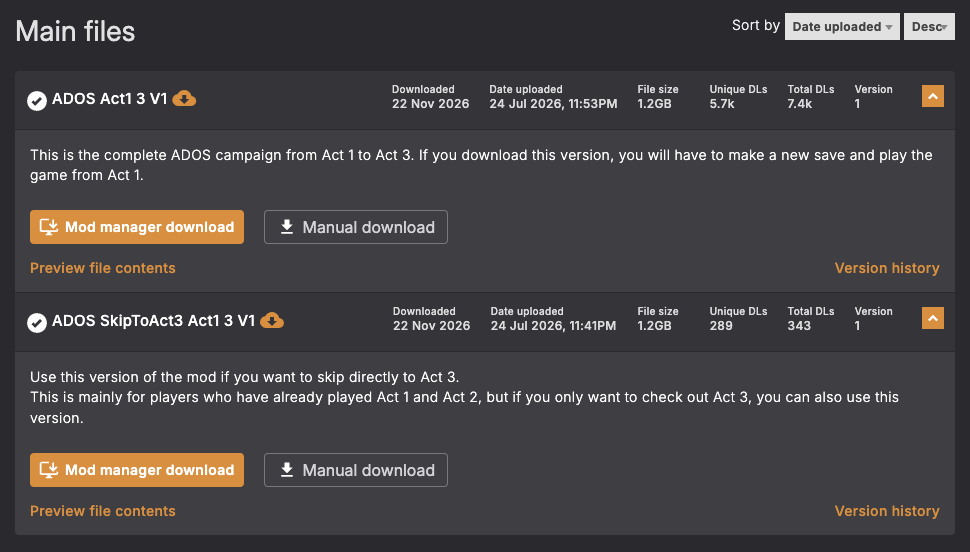
Both editions appear on the same Nexus Mods Files tab under “Act 3.” Match the file name to your starting point and install one edition.
Acts 1–3
Play the whole campaign
Start a new game in Act 1 and keep the same character through the finale. This file includes all three acts.
- Name on Nexus Mods
- ADOS Act1 3 V1
- File ID
- 126372
- Listed size
- 1.2 GB
Act 3 start
Start a new game in Act 3
Choose the outcomes of the first two acts during setup, then enter the finale. Saves from the standalone acts stay with those releases.
- Name on Nexus Mods
- ADOS SkipToAct3 Act1 3 V1
- File ID
- 126369
- Listed size
- 1.2 GB
Install the package
- Download your chosen file. For the free manual option, select Manual download, then Slow download and Standard download if prompted. Wait for your browser’s Downloads list to show the file is complete.
- Extract the archive. Look for the
.pakfile. The package may use the development nameDAY1_152. - Open your BG3 Mods folder. On Windows, paste the path below into File Explorer’s address bar. On Mac, choose Go → Go to Folder in Finder and paste the Mac path.
%LocalAppData%\Larian Studios\Baldur's Gate 3\Mods~/Documents/Larian Studios/Baldur's Gate 3/Mods
- Place the extracted package in that folder. When switching editions, move the previous ADOS
.pakoutside the Mods folder so only your chosen edition is present. Close and reopen BG3 so its manager can see the file.
Folder references Larian Windows support ↗ · Larian Mac support forum ↗
Start the campaign
Open BG3’s in-game Mod Manager and enable ADOS in the installed list. Choose New Game from the main menu. After character creation, the campaign should open in its own world. The author’s installation uses BG3’s built-in manager and does not require Script Extender.
When you go back to an ordinary BG3 campaign, disable ADOS first. This restores the menus for that playthrough. Re-enable the same edition when you return to your ADOS save.
Troubleshooting
What if Nexus says the download is starting or can’t retrieve the link?
Check your browser’s Downloads list. Wait for the ZIP to finish before opening it. If Nexus cannot generate a link, return to the creator’s Files tab while signed in and retry the same edition. If your browser shows an interrupted transfer, use its Resume command when available. Both editions downloaded and unpacked successfully on Mac Chrome in our November 22, 2026 check.
Why does the package say DAY1_152?
That is the author’s development name for the mod. Extract the chosen package and enable ADOS in the installed-mods list. There is no need to rename the package.
BG3 opened the usual campaign. What should I check?
Check that the extracted .pak is in the Mods folder for your account. Restart the game, confirm ADOS is enabled in the installed list, and choose New Game. Loading an existing main-story save takes you back to that save.
Can I import my standalone Act 2 save?
The complete release starts with a fresh save. The skip-to-Act-3 edition lets you choose the outcomes of the first two acts and carry those choices into the finale.
Who can help with a Mac-specific issue?
In the release discussion, Mac players reported being able to play, and some reported dialogue stalls. The Nexus support thread is the place to check current reports. Include the edition, platform and point where progress stopped when asking for help.
For version changes and new reports, check the creator’s instructions ↗ and the mod’s support discussion ↗.
Once you reach camp, the three-act walkthrough starts with your first visit to the tomb. Returning players can jump to the Magic Mirror and Flying Book instructions.
← Back to the campaign overview